Clicking on the image will enlarge to full view.
Supplies
1 tube of your choice - I used the beautiful artwork of Zindy S.D. Nielsen here
Font of Choice - I used Fmiring Campotype
Monti Circular Mask here
“Delightful” is a FTU scrap kit created by
Terry of Treasure’s by Terry and can be downloaded from her blog here. Please leave a thank you when downloading as it’s a small gesture for hard work given freely.
Thank you Terry for sharing such a beautiful freebie! And it’s great to have you back with us again!
This tutorial was written assuming you have a working knowledge of PSP.
~♥~ Let’s get started ~♥~
Open up a 700 X 700 blank canvas.
Flood fill white.
Copy and paste Freame 3 as a new layer.
Resize 70%
Use your Magic Wand and click inside of it.
Selections/Modify/Expand by 6.
Copy and paste Paper 1 as a new layer below the frame.
Resize 60%
Selections/Invert
Tap the delete key.
Deselect.
Merge Visible the paper and frame.
Free rotate left 5 degrees.
Copy and paste Doodle 1 as a new layer.
Resize 50%
Move into position in the center of the frame.
Merge Down.
Copy and paste Frame 4 as a new layer.
Resize 70%
Free rotate right 10 degrees.
Duplicate/Free rotate right 5 degrees
Move the merged layer and both of the frames into position - see my tag for reference.
Highlight the top frame.
Use your Magic Wand and click inside of it.
Selections/Modify/Expand by 6
New Raster layer below the frame.
Copy and paste Paper 3 Into Selection.
Deselect.
Highlight the bottom frame.
Repeat the above step using the same paper.
Copy and paste your tube as a new layer.
Position it before the merged layer.
Paste your tube again.
Resize to be a little larger and move into position below the top frame in your layers pallet.
Move it into the exact position you want it.
Duplicate
Move the duplicate below the bottom frame in your layers pallet.
Highlight the top frame.
Click inside with your Magic Wand.
Selections/Modify/Expand by 6.
Selections/Invert
Highlight the tube that just below the frame.
Tap the delete key.
Deselect.
Change the Properties to Soft Light.
Highlight the bottom frame and repeat the above step.
Add your embellishments. I used:
Laced Ribbon 1: Resize 50%/Free rotate right 15 degrees
Laced Ribbon 2: Resize 50% Free rotate left 5 degrees
Flowers 1 & 2: Resize 50%
Flower 1 again: Resize 25%/Duplcicate/Resize 80%
Ribbon 3 & 4: Resize 50%
Butterflies 2 & 3: Resize 25%
Highlight your white background.
Select All
New Raster layer.
Copy and paste a Paper of choice Into Selection.
Deselect.
Apply the mask.
Merge Group.
Add your credits.
Add your name.
Give it a slight inner bevel:
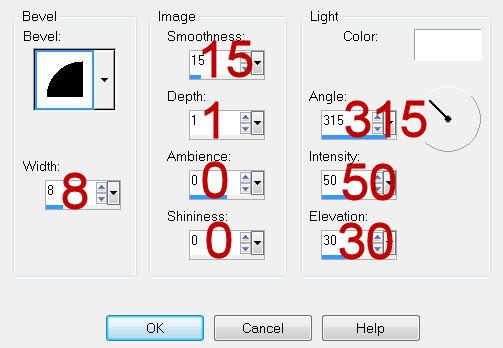
Resize all layers 80%.
I hope you enjoyed this tutorial.
I’d love to see your results and show it off in my gallery.
Email me!
Hugs,
Bev