Clicking on the image will enlarge to full view.
Supplies
5 tubes of your choice - I used the beautiful artwork of Zindy S. D. Nielsen here
Font of Choice - I Oh Lara a pay font
Weescotlass mask 241 here
“Little Black Dress” is a PTU tagger size scrap kit created by Dee of Scraps by Dmg and can be purchased at The North Wing. You can visit her blog here.
Thank you Dee for such a classy kit! Absolutely love it!
This tutorial was written assuming you have a working knowledge of PSP.
~♥~ Let’s get started ~♥~
Open up a 700 X 700 blank canvas.
Flood fill white.
Copy and paste Frame 2 as a new layer.
Use your Selection Tool set on Ellipse and make a circle to outline the inside of the frame.
TIP: It’s alright if the circle isn’t the correct size or even in the very center of the canvas - we can fix that in a bit!
New Raster layer below the frame.
Flood fill with a gradient.
Deselect.
Click on your gradient on your canvas.
If your circle is too large to too small then resize as needed.
If it’s off centered then simply click on your gradient circle on your canvas and use your up and down and side arrow keys on your keyboard to move the circle into proper position.
See! Told ya we could fix it!
Be sure the gradient layer is highlighted in your layers pallet.
Select All/Float/Defloat
Copy and paste the tube you want in the circle as a new layer.
Selections/Invert
Tap the delete key.
Selections/Modify/Feather
Number of Pixels:
43
OK
Tap the delete key until you have the feathered effect you want.
Deselect.
Close out your white background.
Merge Visible.
Reopen your white background.
Now we’re going to create the 4 frames - Don't worry about moving them into position right now. We'll do that in just a bit…
Copy and paste Frame 1 as a new layer.
Resize 35%
Free rotate right 25 degrees.
Duplicate.
Paste Frame 1 again.
Resize 35%
Paste Frame 1 again.
Resize 35%
Free rotate left 5 degrees.
Now move all the frames into position -
See my tag for reference.
Highlight the frame furthest to the left on your canvas.
Click inside with your Magic Wand.
New Raster layer below the frame.
Flood fill with your gradient.
Copy and paste your tube as a new layer.
Resize as needed.
Selections/Invert
Tap the delete key.
Deselect.
Merge Visible the frame, gradient, and tube layer.
Repeat the above step with the remaining frames using a different tube in each frame.
Add your embellishments. I used:
Lace: Resize 65%
Ribbon 3
Charm 1: Resize 35%
Glitter 1: Duplicate/Move down
Highlight your white background.
Select All
New Raster layer.
Copy and paste a paper of choice Into Selection.
Deselect.
Apply the mask.
Merge Group.
Add your credits.
Add your name.
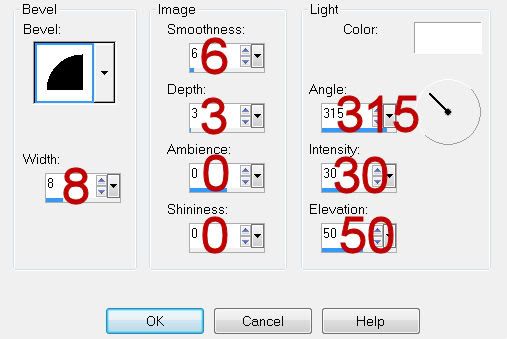
Give it a slight inner bevel:
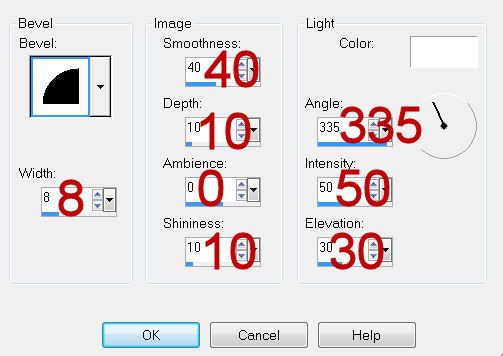
Resize all layers 80%.
I hope you enjoyed this tutorial.
I’d love to see your results and show it off in my gallery.
Email me!
Hugs,
Bev
Copy and paste the tube you want in the circle as a new layer.
Selections/Invert
Tap the delete key.
Selections/Modify/Feather
Number of Pixels:
43
OK
Tap the delete key until you have the feathered effect you want.
Deselect.
Close out your white background.
Merge Visible.
Reopen your white background.
Now we’re going to create the 4 frames - Don't worry about moving them into position right now. We'll do that in just a bit…
Copy and paste Frame 1 as a new layer.
Resize 35%
Free rotate right 25 degrees.
Duplicate.
Paste Frame 1 again.
Resize 35%
Paste Frame 1 again.
Resize 35%
Free rotate left 5 degrees.
Now move all the frames into position -
See my tag for reference.
Highlight the frame furthest to the left on your canvas.
Click inside with your Magic Wand.
New Raster layer below the frame.
Flood fill with your gradient.
Copy and paste your tube as a new layer.
Resize as needed.
Selections/Invert
Tap the delete key.
Deselect.
Merge Visible the frame, gradient, and tube layer.
Repeat the above step with the remaining frames using a different tube in each frame.
Add your embellishments. I used:
Lace: Resize 65%
Ribbon 3
Charm 1: Resize 35%
Glitter 1: Duplicate/Move down
Highlight your white background.
Select All
New Raster layer.
Copy and paste a paper of choice Into Selection.
Deselect.
Apply the mask.
Merge Group.
Add your credits.
Add your name.
Give it a slight inner bevel:
Resize all layers 80%.
I hope you enjoyed this tutorial.
I’d love to see your results and show it off in my gallery.
Email me!
Hugs,
Bev