Supplies Needed
1 image of choice – I'm using the artwork of Barbara Jensen
which you can purchase here
1 image of choice – I'm using the artwork of Barbara Jensen
which you can purchase here
Font of choice - I'm using Aquarelle here
"Memories" PTU taggers kit by RebelChick which can be found at Cotton Candy Kreations and her blog as well, Whisper of a Memory.
This kit is stunning with all its vintage charm. Thank you so much RebelChick!!
"Memories" PTU taggers kit by RebelChick which can be found at Cotton Candy Kreations and her blog as well, Whisper of a Memory.
This kit is stunning with all its vintage charm. Thank you so much RebelChick!!
This tutorial was written assuming you have knowledge of PSP.
~♥~ Let’s get started ~♥~
Open a 600 X 600 transparent canvas. Flood fill white.
Copy and paste Lace 2 as a new layer.
Copy and paste a paper of choice as a new layer. Resize 50%. Free rotate 20 degrees left.
Copy and paste another paper of choice as a new layer. Resize 50%.
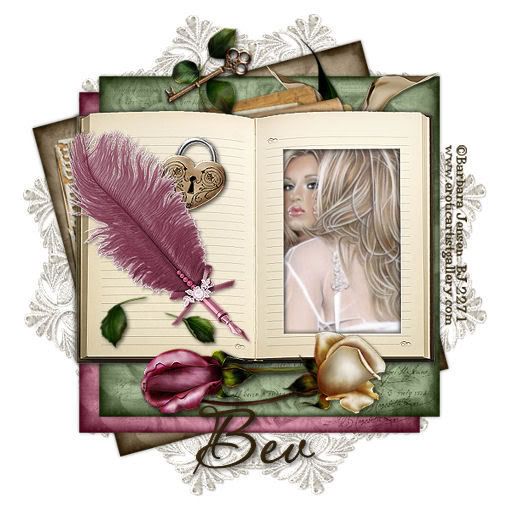
Copy and paste a third paper as a new layer. Resize 50%. See my tag for reference to move them into position.
Copy and paste Book Frame as a new image. Resize 60%. Use your magic wand and click inside the book frame. Selections/Modify/Expand by 2.
Copy and paste your image as a new layer beneath the book frame. Selections/Invert. Hit the delete button.
Copy and paste a feather pen of choice as a new layer. Resize 50%. Move toward the bottom left corner of the book frame. See my tag as reference.
Copy and paste the heart lock as a new layer beneath the feather pen. Resize 30%. Free rotate right 10 degrees.
Copy and paste Rose Leaf 3 as a new layer. Resize 40%. Position near the feather pen.
Copy and paste Rose Leaf 2 as a new layer. Mirror. Resize 30%. Position near the ribbon on the feather pen. Move the layer beneath the feather pen in your layers pallet.
Copy and paste the key as a new layer. Resize 40%. Free rotate 45 degrees to the right. Position over the book frame.
Copy and paste Rose Leaf 1 as a new layer beneath the key layer. Resize 20% and move into position. Again, see my tag as reference.
Copy and paste a Calla Lilly as a new layer beneath the book frame. Resize 50%. Move into position.
Copy and paste Journal 1 as a new layer beneath the book frame. Resize 50%. Free Rotate 20% left. Move into position. See my tag as reference.
Copy and paste Rose 2 as a new layer. Resize 45%. Free rotate 90 degrees left. Position beneath the book frame.
Copy and paste Rose 1 as a new layer. Resize 45%. Free rotate 120 degrees right. Position beneath the book frame.
Add all your copyrights.
Add your name.
I hope you enjoyed this tutorial.
I would love to see your results.
Email me.
Hugs,
Bev